Now Reading: How to Create a Google Business Profile
- 01
How to Create a Google Business Profile


Introduction
Having a strong online presence is crucial for businesses today. One of the most effective ways to achieve this is by creating a Google Business Profile. This free tool not only boosts your local visibility but also builds trust with potential customers by providing essential details about your business. In this comprehensive guide, we’ll break down every step—from gathering the right information to optimizing and managing your profile—to help you succeed in the digital marketplace.
Table of contents
Understanding Google Business Profile
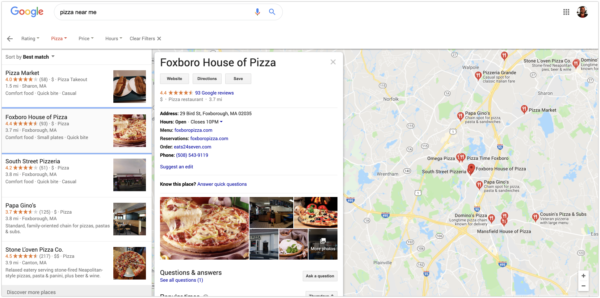
A Google Business Profile is your business’s digital storefront on Google Search and Maps. It serves as a one-stop hub for potential customers to find key details such as your location, hours, contact information, and reviews. Let’s dive into what makes this tool indispensable for local businesses.
What is a Google Business Profile?
A Google Business Profile is a free service offered by Google that allows businesses to manage how they appear across Google Search and Google Maps. It displays critical information like your business name, address, phone number, website, operating hours, and even customer reviews. In essence, it acts as your digital business card, providing customers with the information they need at a glance.
How It Works for Your Business
When someone searches for services you offer or looks for businesses near them, Google uses your Business Profile to display pertinent details. This helps potential customers decide if your business is the right fit for their needs. Think of it as your personal billboard in the bustling online marketplace.
Key Benefits and Features
There are numerous advantages to maintaining an up-to-date Google Business Profile:
- Enhanced Local Visibility: Appear in local search results and on Google Maps.
- Customer Engagement: Receive and respond to reviews, post updates, and interact directly with customers.
- Valuable Insights: Access analytics to understand customer behavior and optimize your marketing strategies.
- Improved Trust: Display verified and consistent business information that builds credibility.
- Cost-Effective Marketing: Enjoy a free platform that reaches millions of potential customers.
Preparing for Profile Creation
Before diving into the actual creation process, proper preparation can save you time and ensure that your profile is accurate and engaging.
Gathering Essential Business Information
Start by collecting all the necessary details about your business. This includes:
- Business Name: Ensure it matches the name used in your branding.
- Address: Your physical location (if applicable) should be accurate and properly formatted.
- Phone Number: Use a direct line so customers can reach you easily.
- Website URL: Link to your official site for more information.
- Operating Hours: Include standard hours as well as any special timings for holidays.
- Business Description: Prepare a brief yet engaging overview of your products or services.
- Photos & Videos: Gather high-quality visuals that represent your business.
Verifying Your Business Eligibility
Not all businesses automatically qualify for a Google Business Profile. Generally, if you have a physical storefront or serve customers in a specific location, you should be eligible. Confirm that your business complies with Google’s guidelines and policies to avoid any issues during the verification process.
Step-by-Step Guide to Creating Your Google Business Profile
Once you have everything in place, it’s time to set up your profile. Follow these steps carefully to ensure a smooth process.
Signing into Your Google Account
To start, log in to your Google Account. If you don’t already have one, you’ll need to create one. This account will be the central hub for managing not only your Business Profile but other Google services as well. Simply go to the Google homepage, click on the “Sign In” button, and enter your credentials.
Entering Accurate Business Details
After signing in, navigate to the Google Business Profile page and click on “Manage now.” You will be prompted to enter your business name and address. Accuracy here is key—incorrect or inconsistent details can confuse potential customers and affect your local search ranking.
Verifying Your Business
Once you’ve entered your business details, Google will ask you to verify your business. Verification is crucial as it proves that your business is legitimate and authorized to manage the profile. There are several methods available:
- Postcard Verification: Google sends a postcard with a verification code to your business address.
- Phone Verification: Some businesses may be eligible to verify via a phone call.
- Email Verification: In certain cases, Google allows verification through email.
- Instant Verification: If your business is already verified with Google Search Console, you might get instant verification.
Follow the instructions provided by Google for your chosen method, and once verified, your profile will be live.
Optimizing Your Google Business Profile
Creating your profile is only the first step. To maximize its effectiveness, you need to continuously optimize and update it.
Enhancing Your Profile with Photos and Videos
Visual content plays a significant role in engaging potential customers. Here’s how to make your profile stand out:
- High-Quality Photos: Upload clear images of your storefront, interior, products, and staff.
- Video Tours: Consider adding a short video that offers a behind-the-scenes look at your business.
- Seasonal Updates: Change your visuals to reflect seasonal promotions or updates.
Crafting a Compelling Business Description
Your business description should be concise yet informative. It’s your opportunity to tell your story and highlight what makes your business unique. Here are some tips:
- Be Authentic: Write in a conversational tone that reflects your brand’s personality.
- Include Keywords: Use relevant keywords that potential customers might search for.
- Focus on Benefits: Highlight what problems your business solves or the unique value you provide.
Utilizing Additional Features and Tools
Google offers several tools to further enhance your profile:
- Services Section: List your offerings to give customers a clear understanding of your business.
- Attributes: Add features such as “wheelchair accessible” or “free Wi-Fi” to appeal to a broader audience.
- Q&A Section: Proactively answer common questions to help customers learn more about your business.
- Google Posts: Use this feature to share updates, offers, and news directly on your profile.
Advanced Tips for Profile Management
Once your profile is set up and optimized, consider these advanced strategies to maintain and enhance your online presence.
Managing Reviews and Responding to Feedback
Customer reviews significantly impact your business’s reputation. Actively monitor reviews and respond promptly:
- Thank Positive Reviews: A simple thank-you goes a long way.
- Address Negative Feedback: Respond professionally and offer solutions where possible.
- Encourage Reviews: Remind satisfied customers to leave positive feedback on your profile.
Leveraging Google Posts for Engagement
Google Posts allow you to share real-time updates and promotions. Regular posts can keep your profile dynamic and engaging:
- Promotional Offers: Highlight special discounts or seasonal sales.
- Event Announcements: Share information about upcoming events or workshops.
- News & Updates: Keep your audience informed about changes or new services.
Analyzing Insights and Performance Metrics
Google provides valuable insights into how customers interact with your profile. Regularly review these metrics to fine-tune your strategy:
- Search Queries: Identify which keywords are driving traffic to your profile.
- Customer Actions: Monitor actions such as clicks on your website, direction requests, and phone calls.
- Photo Views: Determine which images are attracting the most attention, and consider updating or adding similar content.
Troubleshooting and Common Challenges
Despite your best efforts, you may encounter a few challenges along the way. Here are some common issues and how to address them.
Resolving Verification Issues
Verification problems can arise for several reasons. If you’re facing delays or errors, try the following steps:
- Double-Check Details: Ensure your business address and information are accurate.
- Mailbox Readiness: Make sure your mailbox can receive mail from Google.
- Contact Support: If issues persist, reach out to Google support for assistance.
Handling Duplicate Listings
Duplicate listings can confuse customers and dilute your online presence. If you find more than one listing for your business:
- Merge Listings: Use Google’s duplicate management tools or contact support to merge duplicates.
- Update Information: Ensure that all listings have consistent and accurate information.
- Monitor Regularly: Keep an eye on your profile to prevent future duplicates.
Conclusion
Creating and managing a Google Business Profile is a powerful way to boost your online visibility and attract local customers. By following this guide—from gathering essential information to optimizing your profile and managing customer feedback—you’re well on your way to establishing a strong digital presence. Remember, a well-maintained Google Business Profile not only enhances your local SEO search rankings but also builds trust with your audience. So, take the time to set up your profile correctly, optimize it regularly, and watch your business grow.
Frequently Asked Questions (FAQs)
A Google Business Profile is a free tool that allows you to manage how your business appears on Google Search and Maps. It’s essential for enhancing your local search visibility, providing accurate business information, and building trust with potential customers through reviews and updates.
Verification can be done through several methods including receiving a postcard with a verification code, phone, email, or instant verification if you are already verified with Google Search Console. Follow the specific instructions provided by Google during the setup process.
Yes, you can update your business information at any time. Keeping your profile up-to-date with accurate details such as operating hours, contact information, and photos is vital for ensuring customers always have the most current information.
Upload high-quality photos that accurately represent your business. This can include images of your storefront, interior, products, staff, and even videos that provide a virtual tour of your establishment. Consistent, engaging visuals can help attract more customers.
Regular updates are important for keeping your profile active and engaging. Review and update your profile whenever there are changes to your business information, or periodically to reflect new products, services, or promotions. Utilizing Google Posts to share timely updates can also keep your profile dynamic.